Two ways to open it, and what the UK regulator changes for both
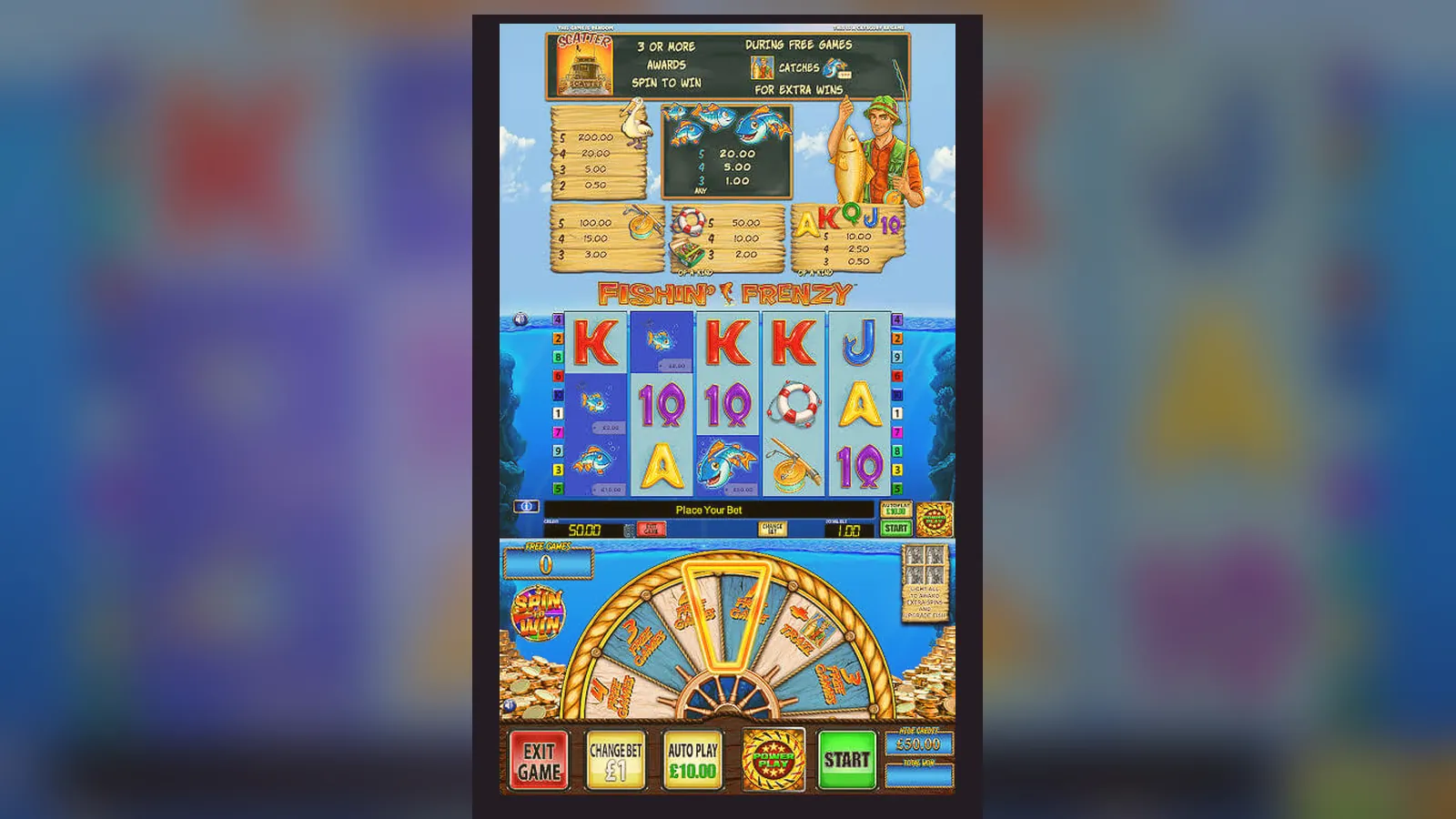
You won't find a standalone Fishin' Frenzy app in the App Store or Play Store. The game runs inside a casino operator's platform — either in a mobile browser or through the operator's own app. Both methods work fine, but the regulatory framework in the United Kingdom shapes what happens behind the scenes: stake caps tied to your age, affordability checks from £150 net deposits a month, and mandatory age verification before you can even load the game in demo mode on many sites.
This page walks through the store-style listing you'd see if it were a standalone release, the actual install paths available to you, the technical requirements, and how to recognise a fake APK if one turns up in search results. Every number here reflects the UKGC-licensed environment; unlicensed sites that bypass these controls are illegal to market in the UK, and you lose recourse if something goes wrong.
The listing you'd see if it sat in a store
Fishin' Frenzy itself isn't packaged as a solo app, but the game's technical profile and the wrapper it runs inside look like this when you break it down into store fields. These numbers are consistent with a slot that's been live since 2014 and updated regularly by Blueprint Gaming.
The 18+ gate isn't optional marketing — it's the legal minimum under the Gambling Act. Operators verify your age and identity before you can deposit, using credit-reference data at the first affordability checkpoint. The game itself asks for no permissions beyond what the operator's app requests: network access, storage for cached assets, and notifications if you opt in.
Four install paths, ranked by common sense
Each method has a different risk profile. Browser play is the safest starting point; operator apps add convenience; APKs from outside the official stores are a security lottery.
- Mobile browser (Safari, Chrome): open the operator's site, log in, find Fishin' Frenzy in the slots library, tap to load. No install step. Stake caps of £5.00 per spin apply automatically, dropping to £2.00 if you're aged 18–24 and the operator has verified your age through credit-reference checks. Risk: near zero. You're on the operator's live platform, and the UKGC licence number sits in the footer for you to cross-check in the public register.
- Add to Home Screen (progressive web app): same browser path, but tap the share icon (iOS) or menu (Android), then «Add to Home Screen». The game icon appears on your phone like a native app, opening the operator's mobile site in a standalone window. No separate download. Risk: near zero, because you're still running the operator's web platform. The only catch is that demo mode may require you to log in first, depending on the site's age-gating policy.
- Operator's native app (App Store or Play Store): download the casino's official app — Betfair Casino, Paddy Power Games, Sky Vegas, or another UKGC-licensed name. Install, verify your age and identity, then browse to Fishin' Frenzy inside the app. The game loads the same HTML5 client you'd see in a browser. Risk: low, provided you download from the official store and check the developer name matches the operator. Fake clones occasionally slip through, so compare the listing against the operator's own website.
- APK sideload (Android only, from a third-party site): someone's repackaged the operator's app or the game client and posted it outside the Play Store. You enable «Install from unknown sources» in Android settings, download the .apk file, and run it. Risk: high. The APK could be the real operator app from an older version, or it could be laced with adware, spyware, or a phishing overlay that intercepts your login. The UKGC has no jurisdiction over unlicensed APKs, so if your account is compromised, you lose the protections of the regulated market. Avoid this path unless you know exactly where the file came from and can verify the signature.
What your phone needs, and what the app requests
Fishin' Frenzy is an HTML5 slot, so it runs in any modern browser without a plugin. The technical floor is low: iOS 12 or later, Android 7.0 or later, and a processor that can handle 60 fps animation for the reel spins and the free-spins overlay. A mid-range phone from 2020 onwards will have no trouble.
- Screen: 4.7 inches minimum; the game scales to fit, but the paytable and settings menu become cramped on anything smaller.
- RAM: 2 GB is enough for the game client; 4 GB if you're running the operator's app alongside other background tasks.
- Storage: 12 MB for the game assets, cached after the first load. Operator apps sit between 40 MB and 80 MB depending on how many games they bundle.
- Network: Wi-Fi or 4G with a stable connection; the game client pulls reel outcomes from the server after every spin, so a patchy connection will freeze mid-round.
- Permissions (operator app): network access (required), storage (caching game assets), notifications (optional, for bonus offers and responsible-gambling reminders), location (optional, some operators use it to confirm you're in the UK when you log in).
If an APK asks for contacts, SMS, or camera access, that's a warning sign — Fishin' Frenzy itself doesn't need any of those. The only camera request that's legitimate comes from KYC verification flows, where you photograph your ID or proof of address, but that happens inside the operator's account area, not as a blanket app permission.
Three screens you'll see, and what's new in this version
The mobile interface adapts Blueprint's desktop layout into a portrait view. You see the 5×3 grid at the top, a spin button centred at the bottom, and a hamburger menu in the corner that slides out the paytable, autoplay settings, and balance. The boat and harbour backdrop scales down but keeps the same colour palette — teal water, yellow deck, and the angler casting a line on the left reel. Coin values, total bet, and balance sit in a strip above the reels; win amounts flash in the centre of the grid when a line hits.
The second screen is the free-spins overlay: when you land three or more scatter symbols (the Fishin' Frenzy logo), the grid dims and a pop-up counts your ten free spins. During those spins, every fish symbol on the reels gets collected by the angler and paid out at the end of the bonus round. The prizes show up as cash amounts that scale with your coin value — £0.50, £1.00, £2.00, up to £20.00 per fish, capped by your base stake. If you're playing at the £5.00 maximum stake, the fish prizes reflect that; if you're capped at £2.00 because you're aged 18–24, the fish prizes drop accordingly.
The third screen is the reality-check prompt, which appears every hour of continuous play. The UKGC requires operators to show you how long you've been playing and how much you've deposited and lost in the session. The prompt pauses the game until you acknowledge it. Some operators add a second layer at the 90-minute mark, asking whether you want to set a time limit. This isn't Fishin' Frenzy's design — it's the regulatory overlay that every UKGC-licensed slot must carry.
Version 2.8.1, released in September 2026, adjusted the mobile UI for phones with notches and dynamic islands, moving the balance display down by 12 pixels so it doesn't hide behind the camera cutout. The update also syncs the autoplay counter with the reality-check timer, so autoplay pauses when the hourly prompt appears instead of queueing spins in the background. No changes to the maths or RTP.
How to recognise a fake, and which permissions are a trap
Fake APKs usually give themselves away in three places: the developer name, the permissions list, and the behaviour after install. A legitimate operator app will show the casino's registered business name in the Play Store listing, and that name will match the UKGC register entry you can look up on the Commission's website. If the developer field says something generic like «Slots Ltd» or «Casino Games Studio», you're looking at a clone.
- Red-flag permissions: SMS read/write (used to intercept two-factor codes), contacts (harvesting your address book), phone state (tracking your IMEI and call history), accessibility services (overlaying fake login screens on top of real apps). Fishin' Frenzy and any legitimate casino app will never ask for these.
- Green-light permissions: network (the game needs internet), storage (caching assets), notifications (opt-in for promotions), location (some operators check you're in a legal jurisdiction). These are normal.
- Behavioural tells: if the app asks you to log in immediately, before showing any game lobby or terms, that's suspicious — most operator apps let you browse the lobby in demo mode before registration. If the app asks you to deposit via a payment link that opens outside the app, or if it redirects you to a site that doesn't match the operator's main domain, close it and uninstall.
- Certificate mismatch: Android lets you check an app's signature in Settings > Apps > [app name] > Advanced > App details. Compare the certificate fingerprint against the one published on the operator's website. If the site doesn't publish one, that's already a poor sign — regulated operators in the UK tend to list this information in their security or FAQ pages.
One last marker: UKGC-licensed operators must display their licence number in the app's terms and conditions or footer. Open the app, find the legal or regulatory section, and look for a string like «Licensed by the UK Gambling Commission, licence 000-000000-X-000000-000». Copy that number and paste it into the UKGC's public register search. If nothing comes up, or the licence belongs to a different company, you've found a fake.
FAQ
Does the £5.00 stake cap apply in the operator's app the same way it does in a browser?
Yes. The cap is a regulatory control enforced at the server level, not a feature of the client. Whether you load Fishin' Frenzy in Safari, Chrome, or an operator's native app, the maximum bet per spin is £5.00 for players aged 25 and over, and £2.00 for players aged 18–24. The operator's platform checks your age and applies the limit before the game client even loads the betting interface.
Why do some casino apps require location access when I open them?
A handful of UKGC-licensed operators use location checks to confirm you're physically in the United Kingdom when you log in, as part of their licence conditions. The UKGC doesn't mandate geolocation for every site, but some operators add it as a compliance layer. If you deny location access, the app may ask you to verify your location another way — usually by cross-checking your IP address or payment method details — or it may block access until you enable the permission. This is legal and routine; it's not a data-harvesting exercise.
What happens if I download an APK from outside the Play Store and it turns out to be fake?
You lose the protections of the regulated market. If the APK contains malware or a phishing overlay that steals your login, the UKGC has no jurisdiction over the entity that distributed it, and the legitimate operator whose branding was cloned isn't liable for your losses. Your bank might reverse fraudulent charges if you catch them early, but there's no guarantee. The risk isn't theoretical — fake gambling APKs are a known vector for credential theft and account takeovers. Stick to the official stores or the browser version.
Can I play Fishin' Frenzy in demo mode through an operator's app without verifying my age first?
It depends on the operator. Some UKGC-licensed sites allow demo play in their apps before you complete age verification, showing you a lobby of games you can try in free mode. Others gate all access — including demo mode — behind age verification, requiring you to upload ID and proof of address before you can even load the game. This is the operator's choice, not a rule in the Gambling Act, but the trend since 2024 has been towards stricter age-gating. If demo access is important to you, check the operator's policy before you install their app.